ShopDreamUp AI ArtDreamUp
Deviation Actions


Suggested Deviants


Suggested Collections


You Might Like…


Featured in Groups





Description
AFTER UNZIPPING, RENAME "HOSTS FILE EDITOR" TO "HOSTS FILE EDITOR.EXE" DA WON'T LET ME UPLOAD EXES, EVEN IF THEY'RE IN ARCHIVES.
=====UPDATE 7/18/2012=====
New version 2.0!
List of new features:
- Improved UI (columns)
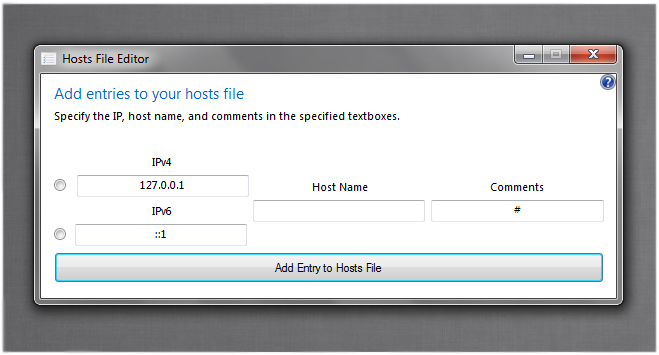
- Choice between IPv4 and IPv6
- Better detection of duplicates
Be sure to Run as Administrator!
Thank you ~vhanla for the great ideas!
=======================
=====UPDATE 7/15/2012=====
New version 1.2!
List of new features:
- Auto-detect drive letter
- Automatically starts a new line (don't have to hit enter first)
- Detects duplicate entries
Thank you ~vhanla for the great ideas!
Please be sure to run it as Administrator!
=====UPDATE 7/14/2012=====
New version 1.1!
Added option to select drive letter. Thanks to ~Tangmeister for the idea!
=======================
My first application ! A tool that lets you add entries to your hosts file. Type your entry and click the button!
Written in Visual Studio Ultimate 2012 RC
=====UPDATE 7/18/2012=====
New version 2.0!
List of new features:
- Improved UI (columns)
- Choice between IPv4 and IPv6
- Better detection of duplicates
Be sure to Run as Administrator!
Thank you ~vhanla for the great ideas!
=======================
=====UPDATE 7/15/2012=====
New version 1.2!
List of new features:
- Auto-detect drive letter
- Automatically starts a new line (don't have to hit enter first)
- Detects duplicate entries
Thank you ~vhanla for the great ideas!
Please be sure to run it as Administrator!
=====UPDATE 7/14/2012=====
New version 1.1!
Added option to select drive letter. Thanks to ~Tangmeister for the idea!
=======================
My first application
! A tool that lets you add entries to your hosts file. Type your entry and click the button!Written in Visual Studio Ultimate 2012 RC
© 2012 - 2024 scritperkid2
Comments20
Join the community to add your comment. Already a deviant? Log In

scritperkid2 do you think you can give me the source code? i need to add arround 32 host entryes to block my kid to enter some sites and i'm only at the start with the programming or just tell me how you did it